RIP Surface connect? It is absent on new Surface Pro 12 and Surface Laptop 13
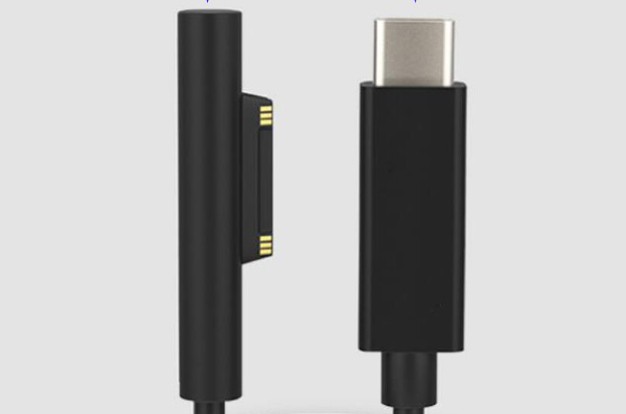
Microsoft’s newest Surface Pro (12‑inch) and Surface Laptop (13‑inch) ship without the magnetic Surface Connect port and charge exclusively via USB‑C. Older Surface chargers and Surface‑Connect docks won’t work. For most people and most orgs, that’s ultimately a win (universal chargers, simpler travel/IT kits, less e‑waste). But you do lose the “trip‑safe” magnetic connector and some legacy accessories.
What just happened?
On May 6, 2025, Microsoft announced a more compact Surface Pro 12‑inch and Surface Laptop 13‑inch. Both models drop the proprietary Surface Connect port in favor of USB‑C charging only. Microsoft also stopped bundling a charger in the box with these machines, aligning with EU e‑waste goals. There is two obvious drivers for this:
- USB‑C is the common charger. Microsoft’s own Surface design was unique and only worked on Microsoft devices
- EU pressure & ecosystem drift. Microsoft had already signaled a shift with the Surface Thunderbolt 4 Dock, which ditched Surface Connect for the more standard USB‑C.
The good stuff (pros)
- One charger to rule them all. You have your phone, headset, power bank all charging with USB-C. And now also your Surface! Travel kits and office drawers get dramatically simpler.
- Easier for IT & less e‑waste. Your IT department does not need to cover multiple charger models on the shelf and te no‑charger‑in‑box policy also aligns with broader EU objectives to reduce electronics waste.
- Docking standard Just any docking station with USB‑C/USB4/TB will work and you’re not locked to Surface‑branded docks. Microsoft’s own Thunderbolt dock already pointed that way.
- Fewer weird edge cases. The Surface Connect ecosystem had quirks (anyone remember the USB‑A port in some power bricks?). Standardizing on USB‑C reduces those special‑case support calls.
The not‑so‑good (cons)
- Your old chargers & Surface‑Connect docks won’t work. If you’ve built a setup on your desk around Surface Connect, that setup needs to be rebuilt and use USB-C
- No charger in the box. Policy‑wise it makes sense, operationally it means you also must buy a compatible USB‑C PD charger for your users
- Goodbye, magnetic “trip‑safe” detach. Surface Connect’s biggest win, like Apple’s MagSafe, was how it snapped off if someone kicked the cable. That’s now gone, and a yanked USB‑C cable can take your laptop with it.
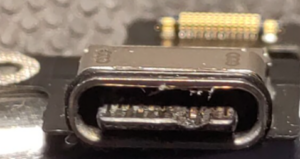
- USB-C is not the best design. Related to the previous point, the USB‑C port can wear out over time, especially with frequent docking and undocking during travel.
What I’m doing for customers (and what I recommend you do)
1) Standardize on USB‑C PD 65 W (or 100 W) chargers
Since there’s no charger in the box, standardize on 65 W as a good floor for most Surfaces; buy a few 100 W units for power users or multi‑device desks.
2) Move to USB4/Thunderbolt docks where you can
You’ll get broad compatibility across vendors and models; Microsoft’s Thunderbolt docks already play in this space, and so do the other big PC brands.
3) Re‑think “trip safety”
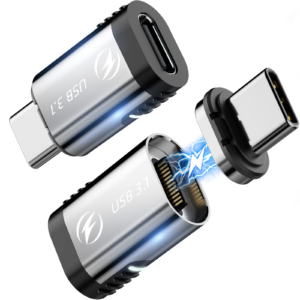
If the magnetic detach was important in classrooms, clinics, or open offices, consider breakaway USB‑C adapters/cables on critical desks. It’s not as elegant as Surface Connect, but it restores the safety characteristic.
4) Prepare USB‑C travel kits
Also prepare travel kits with small light USB-C chargers. (65–100 W PD brick + 2 m cable) part of your onboarding. Your helpdesk will thank you.
My take (short and spicy)
Surface Connect was nice and I’ve had machines saved by that magnetic detach. But the benefits of USB‑C everywhere, for users and IT, outweigh the nostalgia. This is one of those rare moments where simpler is actually better. Keep a couple of breakaway USB‑C cables around, update your dock and charger standards, and move on.
About The Author