Update Secure Boot Certificate by using Intune Remediation – Take 2
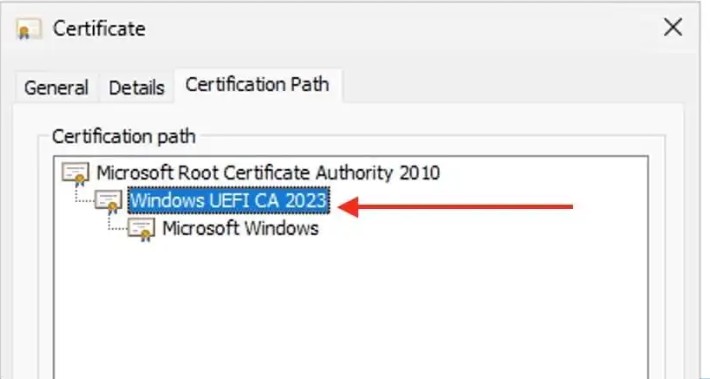
I have had some time to test my scripts and method described in the old blog Update Secure Boot Certificate by using Intune Remediation
And found a lot of small issues with my previous scripts. So now I have published brand new scripts on Github
What went wrong?
I did mistakes! simple as that. To fast to publish before testing the changes I make! Sorry!!!!

In UEFICA2023Status I wrote the wrong values, both in blog and in script. Have no idea where it came from. But now the different statuses should be detected better.
HKLM:\SYSTEM\CurrentControlSet\Control\SecureBoot\Servicing
| UEFICA2023Status | Meaning |
| Not present should be: NotStarted | No update triggered or completed |
| Staged should be: InProgress | CA 2023 certificate files have been staged, pending UEFI update on reboot |
| Updated | CA 2023 successfully added to UEFI Secure Boot DB |
| Failed | Update failed (check UEFICA2023Error and UEFICA2023ErrorEvent for details) |
In AvailableUpdates, I wrote the value 0x240 in both script and blog, It should have been 0x340. And theoretically that should work.
HKLM:\SYSTEM\CurrentControlSet\Control\SecureBoot
| AvailableUpdates | Meaning |
| 0 or not present | No update triggered or completed |
| 0x40(64) | Phase 1 triggered to update and add CA 2023 to DB |
| 0x200(512) | Phase 2 triggered to revoke old CA and enforce new |
| 0x240 (576) should be 0x340 | Both phases triggered |
But I have made some real world testing and found out that setting it to 0x5944 is even more powerful. I was a bit afraid after reading all warnings on Internet for using 0x5944, and yes, It can break things. So be careful. I started out testing on different make and model to see if any of them would break. But I have no broken devices so far. So It seems pretty stable. The different known flags are listed here:
- 0x0002 = ‘0x2:DBX update (apply latest revocations)’
- 0x0004 = ‘0x4:KEK update (add KEK 2K CA 2023)’
- 0x0008 = ‘0x8:Unknown’
- 0x0010 = ‘0x10:Unknown’
- 0x0020 = ‘0x20:SkuSiPolicy update (VBS anti-rollback)’
- 0x0040 = ‘0x40:DB update (add Windows UEFI CA 2023)’
- 0x0080 = ‘0x80:DBX revocation (add Windows PCA 2011 to DBX)’
- 0x0100 = ‘0x100:Install 2023 BootMgr (PCA2023 chain)’
- 0x0200 = ‘0x200:SVN update (anti-rollback counter)’
- 0x0340 = ‘0x340:Update DB, BootMgr and SVN’
- 0x0400 = ‘0x400:SBAT update (firmware targeting)’
- 0x0800 = ‘0x800:Option ROM CA 2023 -> DB’
- 0x1000 = ‘0x1000:Microsoft UEFI CA 2023 -> DB’
- 0x4000 = ‘0x4000:Post reboot stage during BootMgr update’
- 0x4100 = ‘0x4100:Reboot required’
- 0x5944 = ‘0x5944:Update all relevant flags’
Better diagnostics
I have also made all 3 Secure Boot scripts based on the same diagnostics. I found it valuable to always collect diagnostics. even when there is no problems. So a new common function is implemented to get a lot of interesting facts:
[INFO]SecureBootEnabled=Enabled
[INFO]SecureBootPK=Windows OEM Devices PK
[INFO]SecureBootKEK=Microsoft Corporation KEK CA 2011; Microsoft Corporation KEK 2K CA 2023
[INFO]SecureBootDB=Microsoft Windows Production PCA 2011; Windows UEFI CA 2023
[INFO]SecureBootDBHas2023=True
[INFO]FirmwareType=UEFI
[INFO]FirmwareVersion=17.101.143
[INFO]FirmwareDate=2025-11-19
[INFO]TPMPresent=True
[INFO]TPMEnabled=True
[INFO]TPMVersion=2.0
[INFO]TPMEventlogStatus=1808 – 2026-02-06T08:09:40 – This device has updated Secure Boot CA/keys. This device signature information is included here. DeviceAttributes: FirmwareManufacturer:Microsoft Corporation;FirmwareVersion:17.101.143;OEMModelNumber:…
[INFO]HWMake=Microsoft Corporation
[INFO]HWModel=Surface Laptop for Business 7th Edition with Intel
[INFO]HWIsVm=No
[INFO]HWDiskType=GPT
[INFO]OSVersion=Insider Version:26300.7733
[INFO]OSJulySecureBootPatch=True
[INFO]Reg:UEFICA2023Status=Updated
[INFO]Reg:WindowsUEFICA2023Capable=0x2
[INFO]Reg:UEFICA2023Error=
[INFO]Reg:UEFICA2023ErrorEvent=
[INFO]Reg:AvailableUpdates=0x4000
I will add info to this if I find anything more useful.
Better Remediation
I have as noted previously, change the remediation value that I write in registry to 0x5944. And this has made the updates at much better success rate.
But I have also found a scheduled task named “Microsoft\Windows\PI\Secure-Boot-Update”.
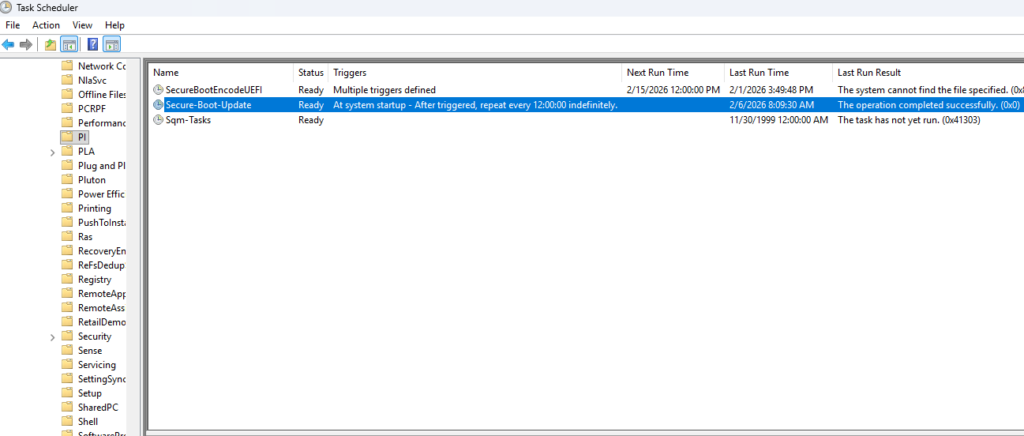
I discovered that if that one was triggered after setting the regvalue, the update started to process. so now I also have that in my remediation script
New verification
I have also uploaded a new script detect-secureboot2023cert to only detect if the Windows UEFI CA 2023 exist in DB. Because if it does, the device is ready!
Hope that will work for all out there! If not, add the issue in Github and I will try to find time to look at it even more.
About The Author